5 Hidden Features of the Zenscreen Touch Mb16Amt You Must Know About
Portable monitors have evolved from niche novelties into essential productivity tools for digital nomads, creative professionals, and remote students. Among the crowded field of secondary displays, the ASUS ZenScreen Touch MB16AMT has established itself as a flagship contender. While most users recognize it for its slim profile and responsive touchscreen, there are several "hidden" features and technical nuances that truly set this device apart from cheaper alternatives. Understanding these deep-level capabilities allows users to transition the device from a simple mirror of their laptop screen into a versatile workstations powerhouse.
The MB16AMT is more than just a 15.6-inch 1080p panel; it is a sophisticated piece of hardware equipped with its own internal power management system, advanced signal processing, and a hybrid-signal solution that bridges the gap between legacy hardware and modern USB-C standards. In this detailed exploration, we look beyond the spec sheet to uncover the features that define the user experience over long-term ownership, focusing on how these elements impact real-world workflows in the electronics and computing space.
Advanced Product Analysis: Beyond the Surface
The ZenScreen Touch MB16AMT utilizes an In-Plane Switching (IPS) panel which is standard for high-quality portable displays, offering 178-degree viewing angles and vibrant color reproduction. However, what makes this specific model stand out in the electronics category is the integration of a 7800mAh battery and a high-precision 10-point multi-touch layer. Unlike many portable monitors that draw power directly from the host device—often draining a laptop's battery in under two hours—the MB16AMT manages its own energy consumption, providing up to four hours of independent operation.
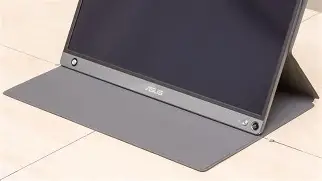
The build quality reflects ASUS’s Zen design philosophy, featuring a spun-metal finish and a lightweight chassis that weighs approximately 0.9kg. The inclusion of the "ZenScreen Pen" and a hole in the corner of the monitor for the pen to act as a stand is a clever engineering trick that demonstrates the brand's focus on portability. However, the true value lies in the internal DisplayWidget software and the hardware's ability to handle complex touch gestures across multiple operating systems, including Android and Windows, which is a rare feat for monitors in this class.
1. Seamless Hybrid-Signal Connectivity and Auto-Rotation
One of the most overlooked technical achievements of the MB16AMT is its hybrid-signal solution. While many modern laptops support DisplayPort Alt Mode via USB-C, many older systems or budget-friendly desktops do not. This monitor includes a driver-based solution that allows it to receive video signals via a standard USB-A 3.0 port. This isn't just a physical adapter; it involves an internal chipset that handles the data-to-video conversion, ensuring that the monitor remains compatible with virtually any computer produced in the last decade.
Furthermore, the MB16AMT features a built-in G-sensor. When used with the ASUS DisplayWidget software on Windows, the monitor identifies its orientation in real-time. This allows for a "seamless pivot" experience. For programmers, this is a game-changer; they can rotate the monitor into portrait mode to view hundreds of lines of code without manual settings adjustments. For social media managers or mobile developers, this provides a natural aspect ratio for testing mobile apps or viewing vertical video feeds without black bars.
2. The Internal Battery as a Power Bank and Sustained Performance
While the internal battery is marketed as a way to "save" your laptop battery, its true hidden utility is its role in maintaining peak brightness and touch sensitivity. Most bus-powered portable monitors are forced to cap their brightness at 30% or 50% when connected to certain laptops or mobile phones that cannot provide enough amperage. Because the MB16AMT has its own 7800mAh cell, it can maintain its full 250 nits of brightness regardless of the host's power output.
Additionally, the monitor can act as a rudimentary power bank for connected mobile devices. When connected to a smartphone via USB-C, the MB16AMT can be configured to either charge the phone or use its own battery to power the display. This is particularly useful for long flights or commutes where outlets are unavailable. This power management is handled through the On-Screen Display (OSD) menu, allowing users to prioritize display longevity or smartphone recharge based on their immediate needs.
3. 10-Point Touch Mapping for Android and Productivity Apps
Touchscreens on external monitors can often feel laggy or inaccurate, but the MB16AMT uses a high-frequency digitizer that allows for gesture-heavy workflows. A hidden feature is the "ZenScreen Touch" app found on the Google Play Store. When connected to an Android phone, this app allows for perfect aspect ratio mapping. Without this, a phone's screen might appear stretched or centered with large borders. The app ensures that the 16:9 1080p canvas is fully utilized, effectively turning a smartphone into a desktop computer.
In a professional setting, this enables "creative mirroring." An illustrator can use a stylus on the MB16AMT while the smartphone handles the processing of the design app. The 10-point multi-touch capability means that complex gestures—such as pinch-to-zoom, rotate, and three-finger swipes for task switching—remain incredibly fluid, mimicking the experience of a high-end tablet while providing the screen real-estate of a laptop.
Discover deals on Electronics — updated daily.
Browse Now →4. TUV Rheinland-Certified Eye Care Technology
In the world of electronics, blue light exposure and screen flicker are major concerns for long-term eye health. The MB16AMT incorporates ASUS Eye Care technology, which is often neglected in marketing bullet points but is vital for anyone working 8+ hours a day. The monitor utilizes a Flicker-free technology that eliminates the rapid cycling of the backlight, which is a primary cause of ocular fatigue and headaches.
Hidden within the OSD are four different Blue Light Filter settings. These are not simple "warm" color profiles; they are hardware-level adjustments that reduce harmful blue light emissions by up to 70%. Level 1 is optimized for normal web browsing, while Level 4 is designed for low-light environments, making it an excellent companion for writers or analysts who work late into the night. This certification from TUV Rheinland ensures that the claims are backed by rigorous scientific testing, a standard many budget portable monitors fail to meet.
5. GamePlus and Multimedia Optimization
While the MB16AMT is primarily positioned as a productivity monitor, it contains "GamePlus" features inherited from ASUS's ROG gaming line. By navigating into the shortcut keys, users can overlay a crosshair or a timer on the screen. This is a "hidden" benefit for casual gamers who use the monitor with a Nintendo Switch or a handheld PC like a Steam Deck. The timer is particularly useful for strategy games or keeping track of spawn rates, while the crosshair helps in shooters that lack a native center-point.
Complementing the visual features are the dual 1W speakers. While 1W sounds minimal, they are tuned for high-frequency clarity. In a pinch, they provide a much …
Pros and Cons
- Pro: Independent Power Source – The built-in 7800mAh battery prevents draining the host device and ensures consistent brightness levels.
- Pro: Versatile Connectivity – USB-C and Micro-HDMI ports, combined with hybrid-signal USB-A support, make it compatible with laptops, consoles, and smartphones.
- Pro: Precision Touchscreen – 10-point multi-touch is responsive enough for both creative work and general navigation across Windows and Android.
- Pro: Portable Aesthetics – At 9mm thick and under 1kg, it fits into most 15-inch laptop sleeves without adding significant bulk.
- Pro: Eye Health Focus – TUV Rheinland-certified flicker-free and low blue light technologies are excellent for professional use.
- Con: Micro-HDMI Port – The use of Micro-HDMI instead of a full-sized port requires a specific cable or adapter which can be easy to lose.
- Con: Audio Power – The 1W speakers are clear but lack the bass and volume needed for noisy environments.
- Con: Glossy Screen – The touch layer results in a glossy finish that can be prone to reflections under direct sunlight or bright office lights.
Model Comparison: Portable Monitor Tiers
To understand where the MB16AMT sits in the current electronics landscape, it is helpful to compare it against other common categories of portable displays. This table illustrates the differences in hardware capabilities that buyers typically look for.
| Feature | Budget Portable (Entry Level) | ASUS ZenScreen MB16AMT | High-End OLED Portable |
|---|---|---|---|
| Panel Type | TN or Basic IPS | Premium IPS (Touch) | OLED |
| Power Source | Bus-powered only | Internal 7800mAh Battery | External or Bus-powered |
| Touch Capability | None | 10-Point Multi-touch | Optional |
| Connectivity | USB-C only | USB-C, Micro-HDMI, USB-A | USB-C, Mini-HDMI |
| Weight | ~1.1kg | ~0.9kg | ~0.7kg |
| Eye Care | Software-based only | Hardware TUV Certified | High (Native Low Blue Light) |
Buying Guide: Is the ZenScreen Touch Right for You?
Choosing the right portable monitor depends heavily on your specific use case. The electronics market is flooded with options, but the MB16AMT targets a very specific demographic: the "Prosumer" who needs reliability and standalone function. If you are considering this device, you should evaluate your needs based on the following criteria.
Compatibility with Your Current Devices
Check if your laptop supports DisplayPort Alt Mode over USB-C. If it does, a single cable will handle video, touch data, and power. If you are using an older laptop with only USB-A ports, the MB16AMT is one of the few high-quality options that will work, though you will need to install the DisplayLink drivers. For smartphone users, check if your device supports "Desktop Mode" (like Samsung DeX or Motorola Ready For) to get the most out of the touch interface.
Battery Needs vs. Portability
The inclusion of a battery adds a small amount of weight and thickness compared to the non-battery ZenScreen models (like the MB16AC). However, the trade-off is often worth it. If you frequently work in cafes or on trains where you cannot plug in your laptop, the internal battery of the MB16AMT is a must-have. It ensures your laptop survives for the duration of your work session rather than being depleted by the external display.
The Importance of Touch
Ask yourself if your workflow benefits from touch. Designers, architects, and data analysts who often need to "scrub" through timelines or pan across large maps will find the touch functionality invaluable. If you only need a second screen for reading static documents or spreadsheets, you might be able to save money by opting for a non-touch version, though you would lose the advanced Android integration features.
Find top-rated Electronics products at great prices.
View Offers →Environmental Factors
Because the screen is glossy to accommodate the touch digitizer, it performs best in controlled lighting. if your primary "office" is outdoors or in high-glare environments, you may find the reflections distracting. However, for most indoor office, home, or airplane environments, the 250-nit brightness is more than sufficient to overcome ambient lighting.
Real-World Use Cases
The versatility of the MB16AMT is best illustrated through how it is currently being used by different types of owners in the field. These scenarios highlight why specific features matter more than just raw specifications.
For the Software Developer, the MB16AMT serves as a dedicated terminal or documentation screen. The auto-rotation feature allows them to flip the monitor vertically next to their laptop. This setup displays significantly more lines of code, reducing the constant need for scrolling. Because the monitor has its own battery, they can move from a desk to a breakout room without needing to carry a power brick for the second screen.
In the case of the Sales Professional, the MB16AMT becomes a presentation tool. Instead of huddling around a single laptop, the salesperson can mirror their screen to the ZenScreen and hand it to the client. The client can then interact with the presentation via touch—zooming in on charts or scrolling through product catalogs. This creates a much more interactive and professional "kiosk" experience that a standard monitor cannot provide.
For the Content Creator, specifically those using mobile devices, this monitor acts as a field recorder and editing station. When connected to a camera that supports HDMI out (via a Micro-HDMI to HDMI cable), the MB16AMT functions as a large-scale monitor for checking focus and composition. Afterward, the creator can plug in their smartphone and use the 10-point touch to edit video on a 15.6-inch canvas, which is far more efficient than trying to manipulate fine timelines on a 6-inch phone screen.
Conclusion
The ASUS ZenScreen Touch MB16AMT remains a benchmark in the portable electronics market because it addresses the practical failures of cheaper bus-powered monitors. By including an internal battery, a robust hybrid-signal chipset, and TUV-certified eye protection, it moves from being a simple accessory to a legitimate professional tool. Its hidden strengths—such as the G-sensor for auto-rotation, the "hidden" gaming overlays, and the sophisticated Android touch mapping—provide a level of utility that justifies its position in the market.
Whether you are looking to expand your digital workspace, enhance your mobile gaming setup, or create a more engaging sales presentation, the MB16AMT offers a combination of features that are rarely found in a single package. While newer technologies like OLED are entering the space, the reliability and comprehensive feature set of this IPS-based powerhouse continue to make it a top recommendation for anyone serious about portable productivity and eye comfort during long-term use.