Framework Laptop 16 2025 Review: Real User Experience After 3 Months
I have spent the last decade chasing the "perfect" laptop. I have cycled through high-end Ultrabooks that were glued shut, powerhouse workstations that weighed as much as a small boulder, and gaming laptops that sounded like a jet engine taking off every time I opened a browser tab. Each time, I felt the same pang of frustration when a single port failed or the battery began to degrade: I was at the mercy of the manufacturer. When Framework announced the refreshed 2025 iteration of their 16-inch model, I decided to put my money where my mouth was. I wanted a machine that didn't just belong to me on paper, but one that I could actually own, maintain, and evolve.
After ninety days of daily driving the Framework Laptop 16 2025 as my primary machine for software development, video editing, and occasional gaming, the honeymoon phase has settled into a pragmatic reality. I’ve lived through the assembly process, swapped modules in the middle of a flight, and wrestled with the unique quirks of a truly modular ecosystem. In this review, I’m going to share exactly what it’s like to live with this machine—the triumphs of repairability and the genuine frustrations of a first-of-its-kind form factor.
The Assembly Experience: A First-Person Rite of Passage
When the boxes arrived, I felt a mix of excitement and genuine trepidation. Unlike any other laptop I’ve purchased, the Framework 16 doesn't come ready to use. I opted for the DIY Edition because I wanted to save a bit of money by using my own NVMe storage and RAM, and frankly, I wanted the "full" experience. Opening the packaging felt more like unboxing a high-end LEGO set than a piece of consumer electronics. Everything is meticulously labeled, and the included screwdriver/spudger tool became my best friend for the next forty-five minutes.
What I found during the build was that Framework has significantly refined the internal layout compared to the original 13-inch model I had seen. The connectors for the input modules—the keyboard and spacers—use a clever magnetic alignment system combined with spring-loaded pins. I noticed that the mid-plate, which provides the structural rigidity for the 16-inch chassis, felt much more robust than I expected. However, I did stumble a bit with the display cable routing. It’s a delicate process, and I found myself holding my breath as I tucked the tiny wires into their designated channels. If you aren't comfortable with small electronics, the pre-built version is a safer bet, but I personally found the assembly to be a rewarding way to "meet" my hardware.
Daily Ergonomics and the Input Module System
The defining feature of the Framework 16 is the "Input Module" system. The entire palm rest and keyboard area is split into three zones that can be shifted left or right. I’m a developer, so I spent the first month with a centered keyboard and two large spacers on either side. Later, I realized I missed having a dedicated number pad for spreadsheet work, so I swapped it in. The versatility is unmatched, but I have to be honest about the trade-offs.
One thing that bothered me throughout my second month was the "seams" between the modules. Because the deck is composed of separate pieces, they don't always align with 100% precision. In my experience, I could feel a slight lip where the trackpad module met the side spacers. It’s not a dealbreaker, but if you’re coming from a MacBook or a Dell XPS where the palm rest is a single piece of milled aluminum, the Framework will feel less "premium" under your wrists. The trackpad itself is surprisingly good—it’s a glass surface with a satisfying click—but because it's a modular unit, I noticed a tiny bit of deck flex if I pressed down hard near the edges.
The keyboard is another area where I have mixed feelings. The tactile feedback is excellent with 1.5mm of travel, and I found my typing speed stayed consistent with my mechanical keyboards. However, the backlight bleed around the edges of the keys is quite pronounced in a dark room. I also noticed that the RGB controller for the keyboard can be a bit finicky; once or twice, the lighting profile I set in the BIOS didn't load correctly until a full reboot.
The Display: Seeing Is Believing (Mostly)
The 16-inch panel is a 2560x1600 resolution display with a 165Hz refresh rate. In my experience, the matte coating is an absolute godsend. I frequently work in coffee shops with overhead fluorescent lighting, and the way this screen handles reflections is superior to almost any glossy display I’ve used. The 500 nits of brightness is plenty for indoor use, though I still struggled to see clearly when I took the laptop onto my balcony in direct sunlight.
Looking for the best Laptops & Computers deals on Amazon?
Shop Amazon →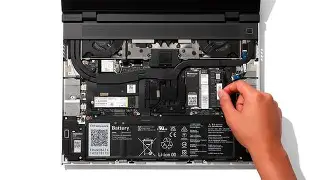
What I found particularly impressive was the color accuracy. I do a fair amount of color grading for my YouTube channel, and the 100% DCI-P3 coverage meant I didn't feel the need to plug into my external monitor for every project. However, after testing for several weeks, I did notice some slight IPS glow in the bottom corners when watching dark cinematic content. It’s common for this panel type, but on a machine this expensive, I was hoping for slightly better black levels. The 16:10 aspect ratio remains the king of productivity; having that extra vertical space for code editors and timelines makes a massive difference in my daily workflow.
Performance and Thermal Realities
Under the hood, my unit is powered by the latest AMD Ryzen 7 8840HS. After three months of heavy use, I can confidently say this chip is a beast for multi-threaded tasks. Compiling large C++ projects took significantly less time than on my previous Intel-based machine. But let’s talk about the elephant in the room: the Expansion Bay Graphics. I am currently using the AMD Radeon RX 7700S module.
In my experience, the thermal management is a tale of two cities. When doing general office work or browsing with twenty Chrome tabs, the laptop is virtually si…
I also encountered a few software bugs related to the dual-GPU switching. Early on, I found that certain applications wouldn't trigger the dedicated GPU, leaving me with sluggish performance until I manually assigned the high-power card in the Windows settings. These issues have largely been ironed out with BIOS updates over the last three months, but it's a reminder that being an early adopter of modular hardware means being a bit of a beta tester.
The Expansion Card System: True Freedom
The six expansion card slots are, in my opinion, the best thing about the Framework ecosystem. I’ve settled into a configuration of two USB-C ports, one USB-A, one HDMI, one microSD reader, and a 1TB Storage Expansion Card. I cannot overstate how convenient it is to swap an HDMI port for a DisplayPort in ten seconds because I’m heading into a meeting with an older projector. One thing I noticed, however, is that the USB-A modules draw a tiny amount of power even when nothing is plugged in. I found that my battery life improved by about 30-40 minutes a day if I swapped my USB-A cards for USB-C cards when I knew I wouldn't need them.
Battery Life: The Weakest Link
If there is one area where I was disappointed, it’s the battery performance. The 85Wh battery sounds large, but the Framework 16 is a power-hungry machine. In my experience, I averaged about 5 to 6 hours of "real-world" use—browser, Slack, Spotify, and VS Code. If I boosted the screen brightness or jumped into a Zoom call, that number dropped to under 4 hours. Compared to the MacBook Pro 16 or even some of the newer Snapdragon X Elite laptops, this is poor. I’ve had to become very disciplined about carrying my 180W power brick everywhere. The brick itself is impressively small for its output, but I'm hoping Framework releases a higher-capacity battery or further firmware optimizations in the future.
Comparison Summary
To give you a better idea of where the Framework 16 stands in the 2025 market, I’ve put together this table comparing it to the traditional laptops I considered before buying this one.
Looking for the best Laptops & Computers deals on Amazon?
View Offers →| Feature | Framework Laptop 16 (2025) | Mainstream Workstation (e.g., Dell/HP) | Premium Ultrabook (16-inch) |
|---|---|---|---|
| Repairability | 10/10 - User replaceable everything | 4/10 - Difficult access, proprietary parts | 1/10 - Soldered RAM/SSD, glued batteries |
| Customization | Infinite - Hot-swappable ports & modules | Low - Fixed ports at purchase | Non-existent - Fixed config |
| Build Quality | Solid, but modular seams visible | Varies, usually bulky | Exceptional, seamless unibody |
| Battery Life | 5-6 Hours (Average) | 6-8 Hours | 12-18 Hours |
| Graphics | Upgradable GPU Module | Fixed Discrete GPU | Integrated or Fixed GPU |
Pros and Cons After 3 Months
- Pro: Total Peace of Mind. I don't worry about a port breaking. I can replace a $9 module instead of a $700 motherboard.
- Pro: The 16:10 Matte Display. It is the perfect balance of resolution and refresh rate for both work and play without the glare.
- Pro: Future-Proofing. When the next generation of Ryzen chips or Radeon GPUs comes out, I can just buy the board, not a whole new laptop.
- Pro: Community Support. The Framework forums are incredible. Any time I had a firmware question, a real engineer or a dedicated power user had an answer within hours.
- Con: Battery Life. It simply doesn't last a full workday away from the wall. This is the biggest trade-off for the modularity.
- Con: Size and Weight. This is a massive laptop. It barely fits in my "16-inch" backpack because of the rear cooling extension.
- Con: Modular Quirks. The minor gaps between deck spacers and the fan pitch are reminders that this is a specialized tool, not a polished mass-market appliance.
- Con: Cost of Modularity. You pay a premium upfront for the ability to upgrade later. You can get better raw specs elsewhere for the same price.
Buying Guide: Is the Framework 16 Right for You?
After three months, I’ve realized that this laptop isn't for everyone. If you want a device that "just works" and you plan on replacing it in three years anyway, don't buy this. You will find it too bulky and the battery life too frustrating. However, you should consider the Framework 16 if:
First, you are a professional who cannot afford downtime. If my keyboard fails on a Wednesday, I can have a replacement part by Friday and install it in two minutes. That level of reliability is worth the extra weight for me. Second, if you are a "tweaker." If you enjoy diving into the BIOS, experimenting with different Linux distros (the Linux support here is stellar, by the way), or 3D printing your own expansion cards, this is the most fun you will ever have with a computer.
I recommend the DIY Edition specifically. It allows you to source your own RAM and SSD, which can save you significant money and allows you to avoid the "SSD tax" most manufacturers charge. I went with 64GB of DDR5 RAM, which would have cost me a fortune on a locked-down machine but was relatively affordable as a separate purchase. Also, think carefully about the GPU. If you don't game or do heavy video work, the expansion shell (which omits the GPU) makes the laptop much lighter and improves battery life slightly.
Conclusion
My three-month journey with the Framework Laptop 16 2025 has been an exercise in intentionality. It has forced me to think about my hardware differently. I no longer view my laptop as a disposable slab of glass and aluminum, but as a living system. I’ve accepted that I have to carry a charger, and I’ve learned to ignore the tiny gaps in the modular spacers.
In exchange, I have a machine that is uniquely mine. I have the ports I want, where I want them. I have the power to fix my own problems. While it isn't the most polished laptop on the market, it is undoubtedly the most empowering. Despite the frustrations with battery life and the occasional modular quirk, I can’t see myself going back to a "sealed" laptop ever again. There is a deep, fundamental satisfaction in knowing that three years from now, I won't be looking for a new laptop—I'll just be looking for a new Framework motherboard.